

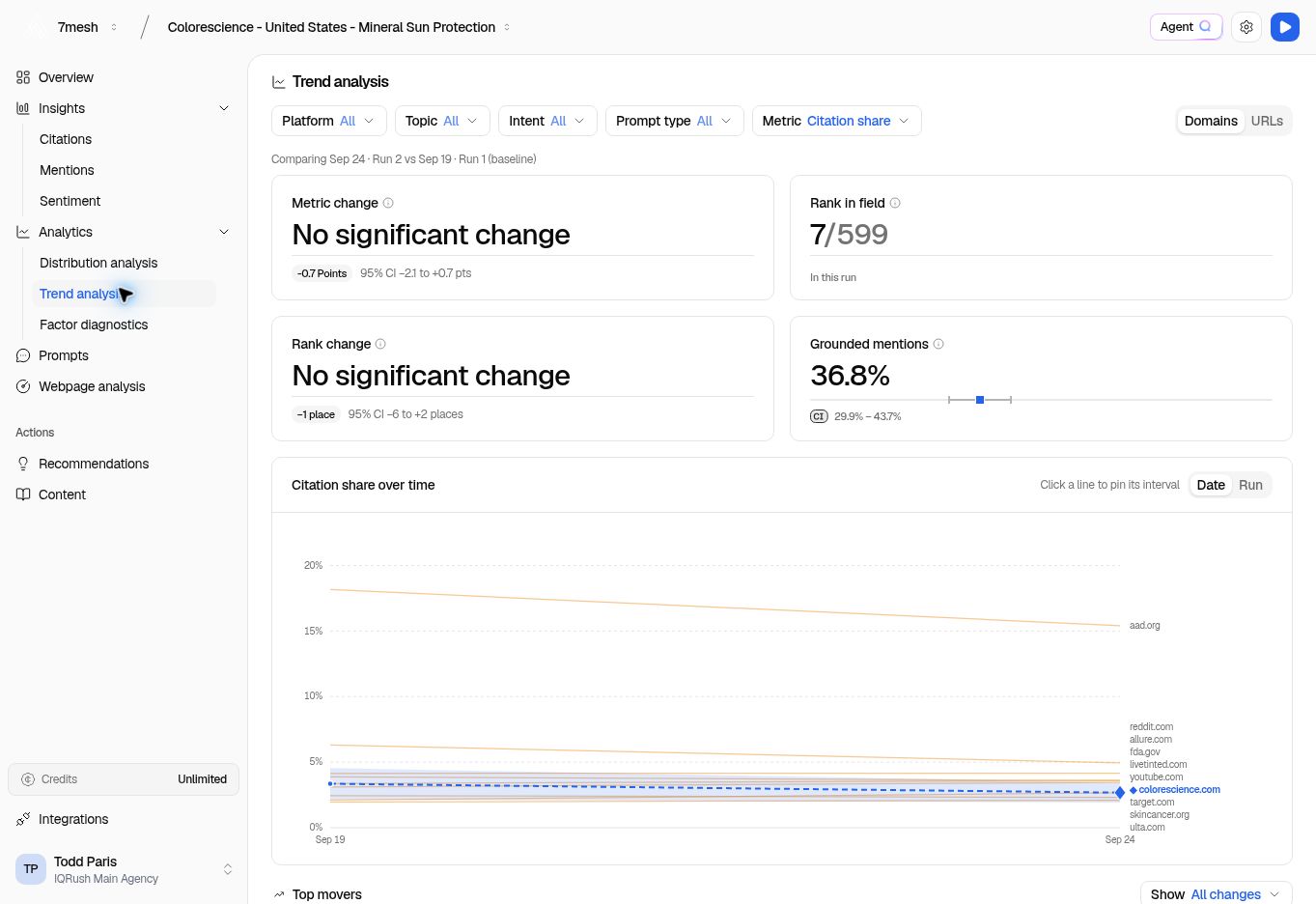
The comparison identifies the two runs. Read the change assessment as well as the number.
Compare the same thing
- Select the run you want to review in Runs.
- Set Platform, Topic, Intent, and Prompt type.
- Select the Metric and, where available, Domains or URLs.
- Check the comparison dates shown on the page.
- In Run comparison, use Reference to choose the run you want to compare against.
Read the result
The Metric change card shows the difference and an assessment such as No significant change. A minus sign does not automatically mean a meaningful decline, just as a plus sign does not automatically mean a meaningful gain. For example, the Colorescience screenshot shows a small decrease in citation share alongside No significant change. The measured decrease is not established as a clear change beyond uncertainty in that comparison. This does not prove the result stayed exactly the same. Confidence intervals are essential to this judgment. AI answers vary, so the difference between two point estimates can be noise. Read the 95% CI on the change where shown, together with the page’s assessment. A change interval that includes zero leaves no clear direction established at that level; use the product’s verdict rather than judging significance from the size or color of a number alone. Where the unit is Points or pts, it means percentage points for these percentage metrics. A move from 20% to 25% is a five-point increase. When IQRush identifies a significant change, consider its practical size and inspect the supporting evidence before choosing an action. Statistical significance and business importance are separate questions. Review rank changes separately. Other sources can move too, so rank and share do not have to move together. Grounded mentions shows the share of mentions linked to a website reference in the latest run. It is different from mention coverage, which describes how widely a name appears across responses.Inspect the detail
- Use the time-series chart to follow the selected result.
- Switch between Date and Run to change the horizontal view.
- Select a series to inspect its interval.
- In Top movers, review Biggest risers and Biggest decliners. Use Show and search to narrow the table.
- Check Run comparison for the source, change, confidence interval, and signal.