

Open runs
Select the blue play button at the top right, named Runs. The dialog brings together the schedule, run history, and the action to start a run.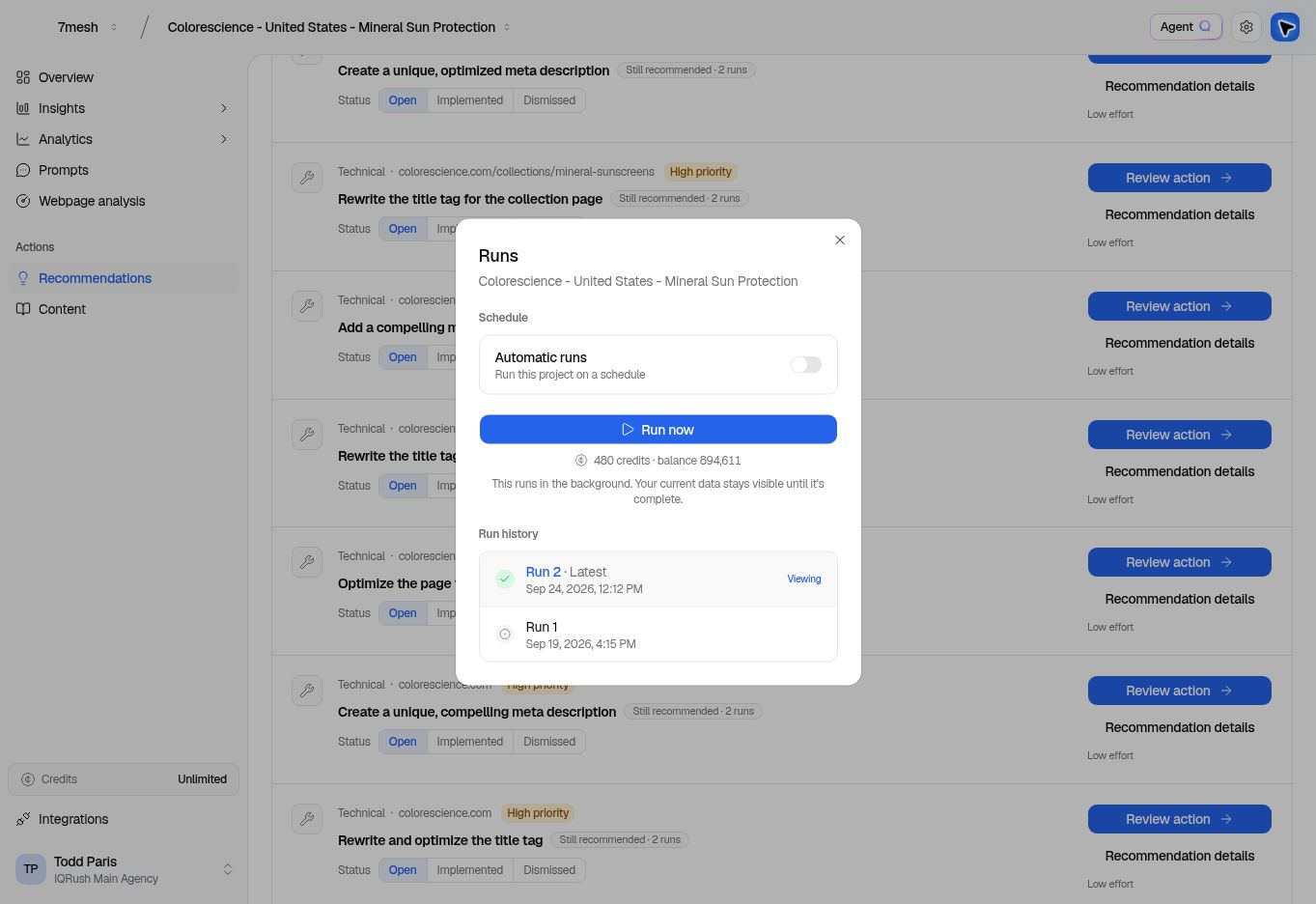
Check the estimate before Run now. Select a completed entry in Run history to view that run’s results.
Start a run
- Confirm the workspace and project at the top of the app.
- Open Runs.
- Check the credit estimate and available balance.
- Select Run now.
- Follow the displayed status while the run completes.
Check whether the completed result supports a decision
A completed run means the processing has finished. Next, open Insights → Citations and read Results stability. Its Converged assessment requires both a settled ranking and sufficient signal relative to noise. The Domain SNR reading is key to judging whether the measured differences are clear enough. It is a signal-to-noise ratio, with a displayed target of 1.00. Below that target, the ranking lacks sufficient separation from measurement noise. Reaching the target addresses that check; Rank stability must also pass. Use the displayed verdict, rather than rounding a near-target value yourself. Too little evidence can leave you with an unsettled or unclear result. Once the result has converged and the confidence intervals are precise enough for your decision, collecting many more answers may add little value for the resources used. More is not automatically better. Read processing status in Runs and measurement sufficiency in Results stability. Use both to plan the next measurement. If a completed result is Not converged, review its prompt design and scope before planning more measurement. A later run is a new measurement; do not assume it adds responses to the earlier run. Read the stability and confidence-interval explanation before treating a rank or movement as a firm finding.Review an earlier run
Choose a completed entry in Run history. The entry marked Viewing identifies the run currently selected. Return to the latest completed run when you want the most recent results. When two people discuss a result, agree on the run and filters first. Different selections can produce different numbers.Schedule automatic runs
In the Schedule section:- Turn on Automatic runs, if the control is available for your account.
- Choose Frequency.
- Choose Time and check the time zone shown beside it.
- Check the save status or any error message.