> ## Documentation Index
> Fetch the complete documentation index at: https://docs.iqrush.ai/llms.txt
> Use this file to discover all available pages before exploring further.
# Work through a technical recommendation
> Technical recommendations describe changes to your website, such as a page title or meta description.
Technical recommendations describe changes to your website, such as a page title or meta description. Use them to prepare a clear task for the person who maintains the site.
## Find the action
1. Open **Recommendations → All recommendations**.
2. Choose **Technical**.
3. Use **Search recommendations** or the status filter to find an item.
4. Select **Review action** or open its title.
 ## Check the task before handing it off
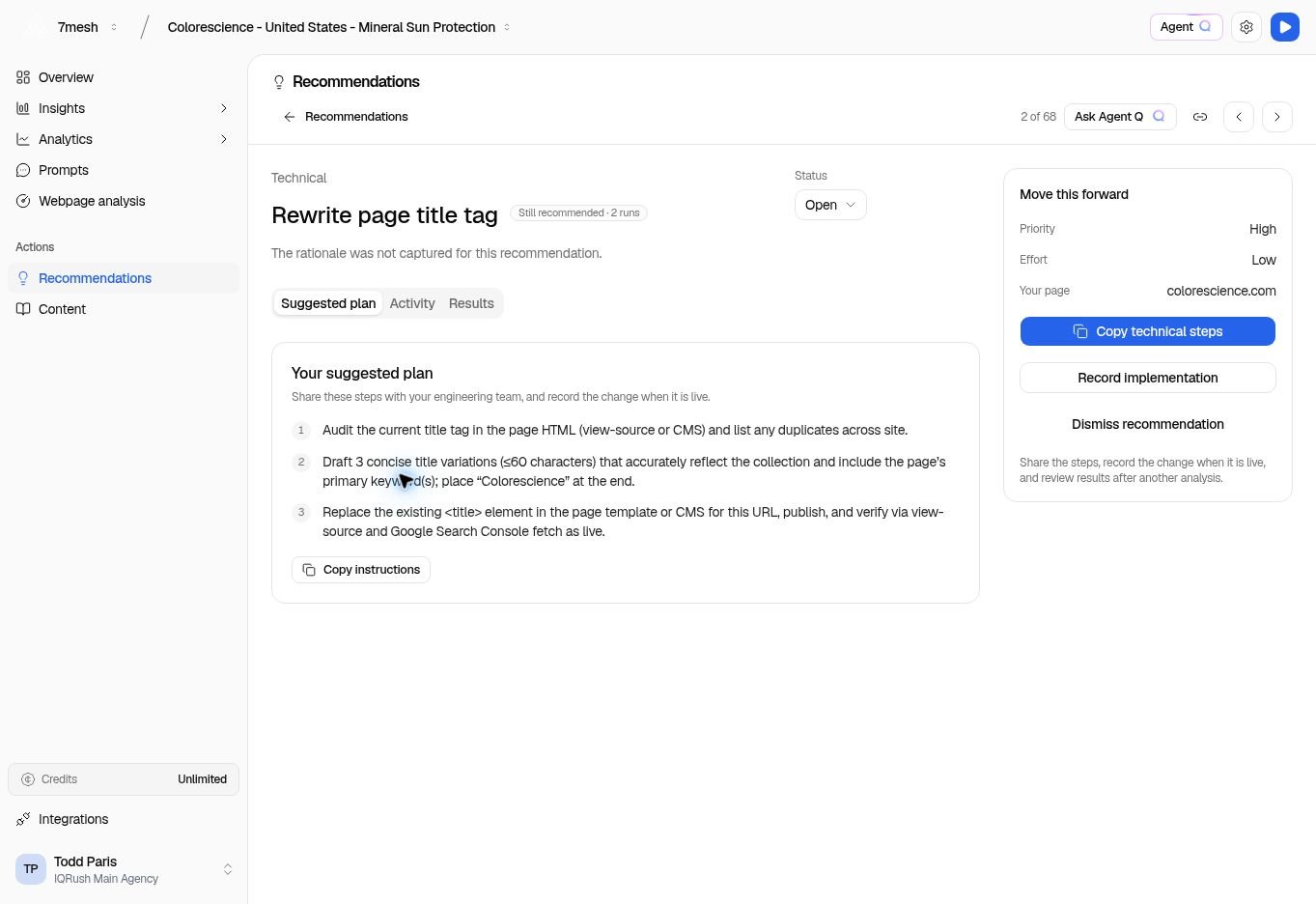
Read **Your suggested plan**, **Priority**, **Effort**, and **Your page**. Confirm the exact page that needs the change.
The example shows **Rewrite page title tag** for a Colorescience collection page. The steps describe reviewing the current title, preparing an appropriate replacement, and verifying the published change.
If the page says the rationale was not captured, that explanation is unavailable. Do not assume a missing rationale or evidence reference exists elsewhere.
## Share the instructions
Use **Copy technical steps** or **Copy instructions** to copy the supplied task. Include the page address and enough context for the person doing the work to identify it.
Ask the site owner or editor to check the current page before applying the recommendation. The website may have changed since the run.
The work happens in your website’s publishing or development process. The copy button does not apply the change to your site.
## Record the completed change
After the change is live and checked, select **Record implementation**. Enter when it was completed, what changed, and the live location when useful.
If the recommendation does not fit your plans, use **Dismiss recommendation** and explain why.
## Ask Agent Q to explain the work
“Summarize this technical recommendation for our web team, including what they should verify after implementation.”
Bring the recommendation into the conversation and ask for an explanation suited to the person doing the work. See more [questions and reports](/guides/31-questions-and-reports).
**Next:** [Record implementation and review results](/guides/22-complete-recommendations).
This documentation is built and hosted on [Mintlify](https://mintlify.com), a developer documentation platform.
## Check the task before handing it off
Read **Your suggested plan**, **Priority**, **Effort**, and **Your page**. Confirm the exact page that needs the change.
The example shows **Rewrite page title tag** for a Colorescience collection page. The steps describe reviewing the current title, preparing an appropriate replacement, and verifying the published change.
If the page says the rationale was not captured, that explanation is unavailable. Do not assume a missing rationale or evidence reference exists elsewhere.
## Share the instructions
Use **Copy technical steps** or **Copy instructions** to copy the supplied task. Include the page address and enough context for the person doing the work to identify it.
Ask the site owner or editor to check the current page before applying the recommendation. The website may have changed since the run.
The work happens in your website’s publishing or development process. The copy button does not apply the change to your site.
## Record the completed change
After the change is live and checked, select **Record implementation**. Enter when it was completed, what changed, and the live location when useful.
If the recommendation does not fit your plans, use **Dismiss recommendation** and explain why.
## Ask Agent Q to explain the work
“Summarize this technical recommendation for our web team, including what they should verify after implementation.”
Bring the recommendation into the conversation and ask for an explanation suited to the person doing the work. See more [questions and reports](/guides/31-questions-and-reports).
**Next:** [Record implementation and review results](/guides/22-complete-recommendations).
This documentation is built and hosted on [Mintlify](https://mintlify.com), a developer documentation platform.