> ## Documentation Index
> Fetch the complete documentation index at: https://docs.iqrush.ai/llms.txt
> Use this file to discover all available pages before exploring further.
# Review and export finished content
> Before handing off a draft, check the facts, the brief, and the text your reader will see.
Before handing off a draft, check the facts, the brief, and the text your reader will see.
## Use the editorial checklist
1. Open the document in Content Playground.
2. Select **More actions** (the three-dot menu beside Export).
3. Select **Notes and checklist**.
4. Add useful handoff information in **Editorial notes**.
5. Complete the review checks after doing the review.
6. Select **Mark ready for review** when it becomes available.
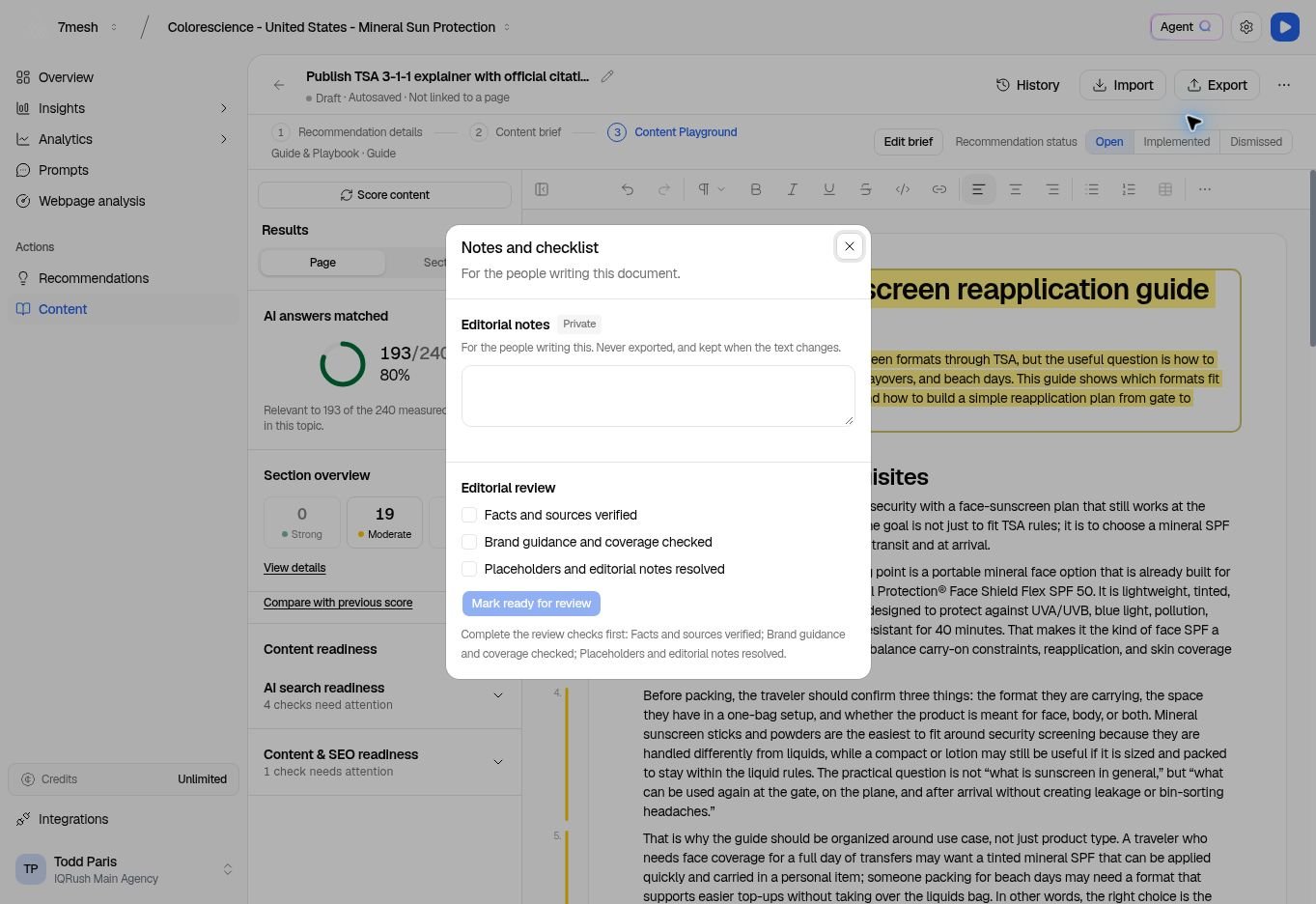 The displayed checks are:
* **Facts and sources verified**
* **Brand guidance and coverage checked**
* **Placeholders and editorial notes resolved**
**Editorial notes** are for the people writing the document. They are kept when the text changes and are not included in exports. Check the document body itself for any comments or placeholders you do not want readers to see.
**Mark ready for review** sets the writing label to **In review**. It does not approve the content. If the text changes afterward, the review checks clear so the new text can be checked again.
## Export the document
1. Wait for **Autosaved**.
2. Select **Export**.
3. Choose the format.
4. Select the download button for that format, or use **Copy text** when appropriate.
The displayed checks are:
* **Facts and sources verified**
* **Brand guidance and coverage checked**
* **Placeholders and editorial notes resolved**
**Editorial notes** are for the people writing the document. They are kept when the text changes and are not included in exports. Check the document body itself for any comments or placeholders you do not want readers to see.
**Mark ready for review** sets the writing label to **In review**. It does not approve the content. If the text changes afterward, the review checks clear so the new text can be checked again.
## Export the document
1. Wait for **Autosaved**.
2. Select **Export**.
3. Choose the format.
4. Select the download button for that format, or use **Copy text** when appropriate.
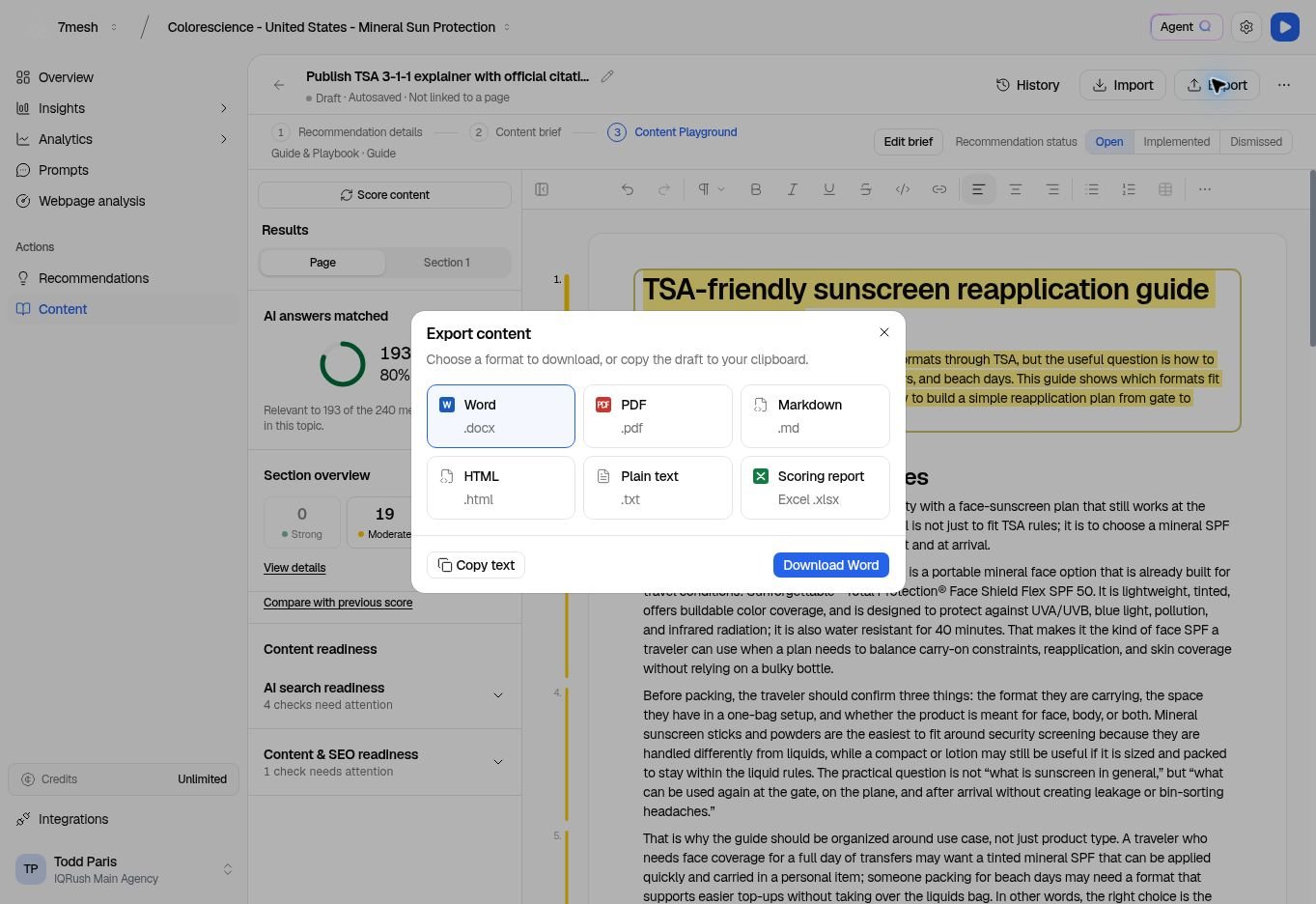 | Format | Useful for |
| - | - |
| **Word (.docx)** | Editing and review in Word-compatible tools. |
| **PDF (.pdf)** | Sharing a fixed reading copy. |
| **Markdown (.md)** | A text-based content workflow. |
| **HTML (.html)** | A website or publishing workflow that accepts HTML. |
| **Plain text (.txt)** | Copy without document formatting. |
| **Scoring report — Excel (.xlsx)** | Reviewing available scoring information separately from the draft. |
Use the available formats shown for the document. A scoring report needs scoring information to report.
## Publish and record the work
Exporting downloads a file. It does not publish to your website and does not complete the linked recommendation.
Publish through your normal process, confirm the live result, then return to the recommendation to record what was completed.
**Next:** [Record implementation and review results](/guides/22-complete-recommendations).
This documentation is built and hosted on [Mintlify](https://mintlify.com), a developer documentation platform.
| Format | Useful for |
| - | - |
| **Word (.docx)** | Editing and review in Word-compatible tools. |
| **PDF (.pdf)** | Sharing a fixed reading copy. |
| **Markdown (.md)** | A text-based content workflow. |
| **HTML (.html)** | A website or publishing workflow that accepts HTML. |
| **Plain text (.txt)** | Copy without document formatting. |
| **Scoring report — Excel (.xlsx)** | Reviewing available scoring information separately from the draft. |
Use the available formats shown for the document. A scoring report needs scoring information to report.
## Publish and record the work
Exporting downloads a file. It does not publish to your website and does not complete the linked recommendation.
Publish through your normal process, confirm the live result, then return to the recommendation to record what was completed.
**Next:** [Record implementation and review results](/guides/22-complete-recommendations).
This documentation is built and hosted on [Mintlify](https://mintlify.com), a developer documentation platform.