> ## Documentation Index
> Fetch the complete documentation index at: https://docs.iqrush.ai/llms.txt
> Use this file to discover all available pages before exploring further.
# Save and return to a document version
> 2.
**Autosaved** protects your current working draft. **History** lets you save and inspect particular versions.
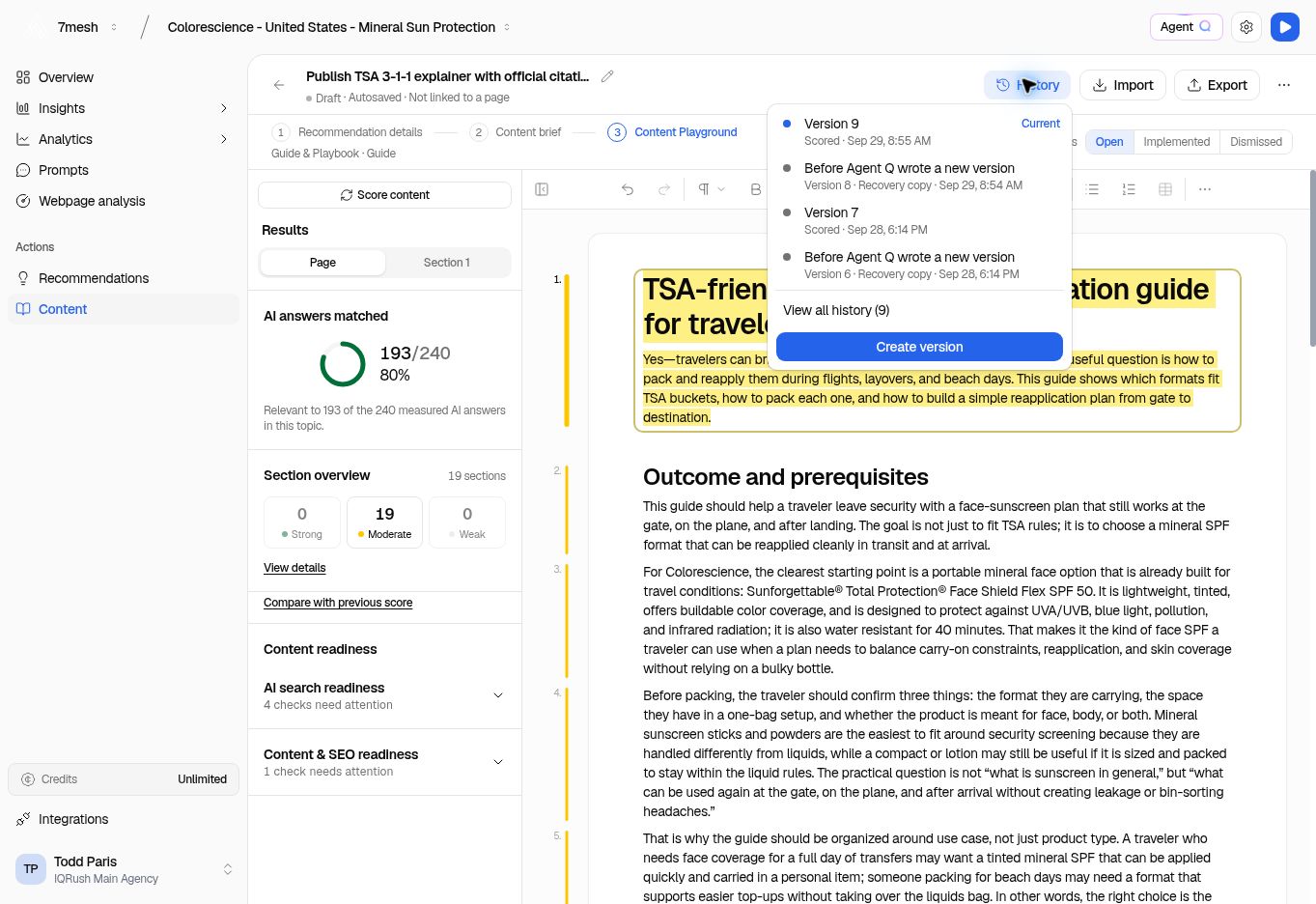 ## Save a named version
1. Open the document in Content Playground.
2. Wait for the latest text to save.
3. Select **History**.
4. Select **Create version**.
5. Enter a name, such as “First editorial review,” or leave the name empty for default naming.
6. Select **Create version** in the dialog.
Save a named version before a substantial rewrite or an editorial handoff. A useful name tells your teammate why the version matters.
## Inspect an earlier version
1. Open **History**.
2. Select a saved version.
3. Use **View all history** if the one you need is not in the recent list.
4. Read the version in the preview. Use **Show changes** when it is available to compare the text.
5. Use **Back to current version** when you are finished.
Opening a version for preview does not, by itself, replace the working draft.
## Restore a version
If you want the earlier text to become the working draft, choose **Restore this version** from the preview and read the confirmation. Select **Restore version** to replace the current text.
The current document is saved as a recovery version before the replacement. Check the restored text and its save status afterward.
A restored draft may need scoring again. A score belongs to the text that was measured, so use the current score state to decide whether to update it.
## Understand automatic entries
History can include entries created by scoring or by preserving text before another action, such as **Before Agent Q wrote a new version**. These entries help you recover earlier text; they do not indicate editorial approval or publication.
**Next:** [Review and export](/guides/20-review-export).
This documentation is built and hosted on [Mintlify](https://mintlify.com), a developer documentation platform.
## Save a named version
1. Open the document in Content Playground.
2. Wait for the latest text to save.
3. Select **History**.
4. Select **Create version**.
5. Enter a name, such as “First editorial review,” or leave the name empty for default naming.
6. Select **Create version** in the dialog.
Save a named version before a substantial rewrite or an editorial handoff. A useful name tells your teammate why the version matters.
## Inspect an earlier version
1. Open **History**.
2. Select a saved version.
3. Use **View all history** if the one you need is not in the recent list.
4. Read the version in the preview. Use **Show changes** when it is available to compare the text.
5. Use **Back to current version** when you are finished.
Opening a version for preview does not, by itself, replace the working draft.
## Restore a version
If you want the earlier text to become the working draft, choose **Restore this version** from the preview and read the confirmation. Select **Restore version** to replace the current text.
The current document is saved as a recovery version before the replacement. Check the restored text and its save status afterward.
A restored draft may need scoring again. A score belongs to the text that was measured, so use the current score state to decide whether to update it.
## Understand automatic entries
History can include entries created by scoring or by preserving text before another action, such as **Before Agent Q wrote a new version**. These entries help you recover earlier text; they do not indicate editorial approval or publication.
**Next:** [Review and export](/guides/20-review-export).
This documentation is built and hosted on [Mintlify](https://mintlify.com), a developer documentation platform.