> ## Documentation Index
> Fetch the complete documentation index at: https://docs.iqrush.ai/llms.txt
> Use this file to discover all available pages before exploring further.
# Check a draft and improve its weak sections
> Use Content analysis beside the editor to understand how the current draft relates to the project’s measured AI answers and to review content-readiness checks.
Use **Content analysis** beside the editor to understand how the current draft relates to the project’s measured AI answers and to review content-readiness checks.
## Score the current text
1. Open the draft in **Content Playground**.
2. Wait for the latest edits to save.
3. Select **Score content**. If the text has changed since scoring, use **Update score** when shown.
4. Read the results once scoring completes.
If an earlier score is still visible after edits, it describes the earlier text. Update it before using the numbers to judge the current draft.
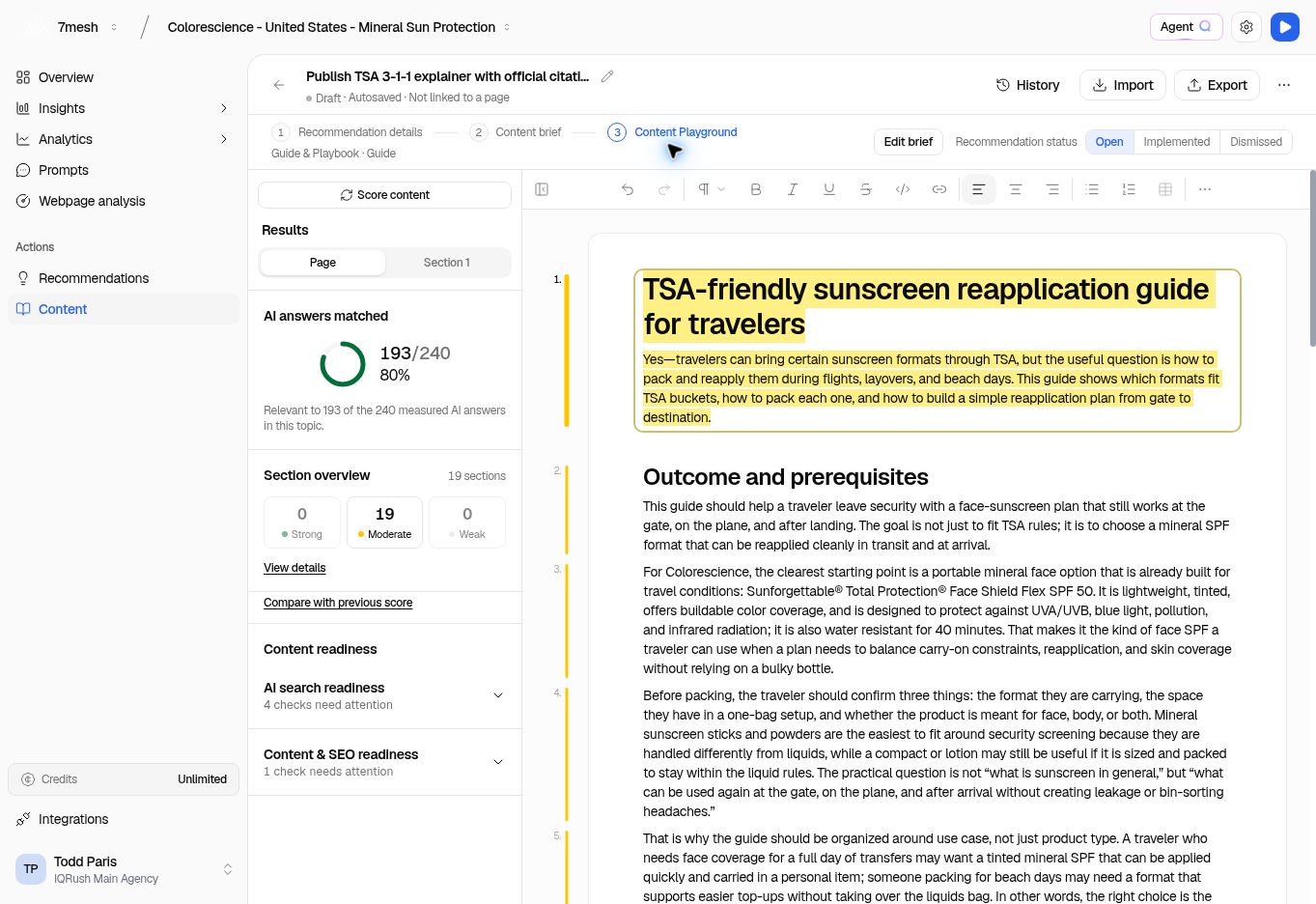 ## Read the result in plain terms
| Control or result | What to do with it |
| - | - |
| **AI answers matched** | Read how many measured answers the content is relevant to in the selected context. |
| **Section overview** | See the distribution of **Strong**, **Moderate**, and **Weak** sections. |
| **View details** | Open the section detail to see where to investigate. |
| **Compare with previous score** | Review changes against an available earlier score. |
| **AI search readiness** | Expand the checks and read what needs attention. |
| **Content & SEO readiness** | Expand the checks for content and page improvements. |
In the example, **193 / 240, 80%** means the content was relevant to 193 of the 240 measured answers in that topic. It does not mean an 80% probability of being cited.
The readiness checks are separate from the matched-answer result. A draft can match many answers and still need work on accuracy, coverage, or readiness.
Read the scope sentence under **AI answers matched**: it identifies whether the comparison uses a topic or the project. **Section overview** groups the sections by the available citation and relevance evidence; Strong, Moderate, and Weak are not editorial grades for the writing.
Content scoring also serves a different purpose from **Results stability**. A high matched-answer percentage does not establish that a project’s visibility ranking has converged, and scoring a draft does not show that the live page has earned new citations.
## Improve one section at a time
1. Choose a section in the document or the section detail.
2. Read the explanation and available evidence for that section.
3. Make an edit that improves the reader’s understanding: answer the question more directly, add a supported fact, or clarify a confusing passage.
4. Update the score.
5. Compare the new result with the earlier score, where available.
Do not remove useful content solely to improve a number. The final piece still needs to be accurate, complete, and helpful to its intended reader.
For an existing page, distinguish the captured published-page result from the draft’s latest score. Follow the labels describing which text was measured.
**Next:** [Review and export the draft](/guides/20-review-export).
This documentation is built and hosted on [Mintlify](https://mintlify.com), a developer documentation platform.
## Read the result in plain terms
| Control or result | What to do with it |
| - | - |
| **AI answers matched** | Read how many measured answers the content is relevant to in the selected context. |
| **Section overview** | See the distribution of **Strong**, **Moderate**, and **Weak** sections. |
| **View details** | Open the section detail to see where to investigate. |
| **Compare with previous score** | Review changes against an available earlier score. |
| **AI search readiness** | Expand the checks and read what needs attention. |
| **Content & SEO readiness** | Expand the checks for content and page improvements. |
In the example, **193 / 240, 80%** means the content was relevant to 193 of the 240 measured answers in that topic. It does not mean an 80% probability of being cited.
The readiness checks are separate from the matched-answer result. A draft can match many answers and still need work on accuracy, coverage, or readiness.
Read the scope sentence under **AI answers matched**: it identifies whether the comparison uses a topic or the project. **Section overview** groups the sections by the available citation and relevance evidence; Strong, Moderate, and Weak are not editorial grades for the writing.
Content scoring also serves a different purpose from **Results stability**. A high matched-answer percentage does not establish that a project’s visibility ranking has converged, and scoring a draft does not show that the live page has earned new citations.
## Improve one section at a time
1. Choose a section in the document or the section detail.
2. Read the explanation and available evidence for that section.
3. Make an edit that improves the reader’s understanding: answer the question more directly, add a supported fact, or clarify a confusing passage.
4. Update the score.
5. Compare the new result with the earlier score, where available.
Do not remove useful content solely to improve a number. The final piece still needs to be accurate, complete, and helpful to its intended reader.
For an existing page, distinguish the captured published-page result from the draft’s latest score. Follow the labels describing which text was measured.
**Next:** [Review and export the draft](/guides/20-review-export).
This documentation is built and hosted on [Mintlify](https://mintlify.com), a developer documentation platform.