> ## Documentation Index
> Fetch the complete documentation index at: https://docs.iqrush.ai/llms.txt
> Use this file to discover all available pages before exploring further.
# Create, open, and find content
> Open Content in the left menu.
Open **Content** in the left menu. This is the home for your project’s saved writing.
## Choose a starting point
| Your task | Choose |
| - | - |
| Write something new | **Start writing** under **Create content**. |
| Work from a recommendation | **Use a recommendation**. |
| Improve a page on your site | **Open existing content** under **Improve existing content**. |
| Return to a saved draft | Find it in **Your content**, then choose **Continue editing**. |
A new blank draft does not have the same citation history as an existing page. Choose the starting point that matches the work you are doing.
## Open an existing page
1. Select **Open existing content**.
2. Use **Search by page title or URL…** to find the page.
3. Select the matching title and URL.
4. Review the draft and its page link after it opens.
If your page is not in the captured list, the picker can offer to capture an address on one of the project’s own domains. Follow the option and any message shown for that address. A page on a competitor’s domain is not treated as your own existing page.
Working on a draft does not update the live website.
## Find a saved item
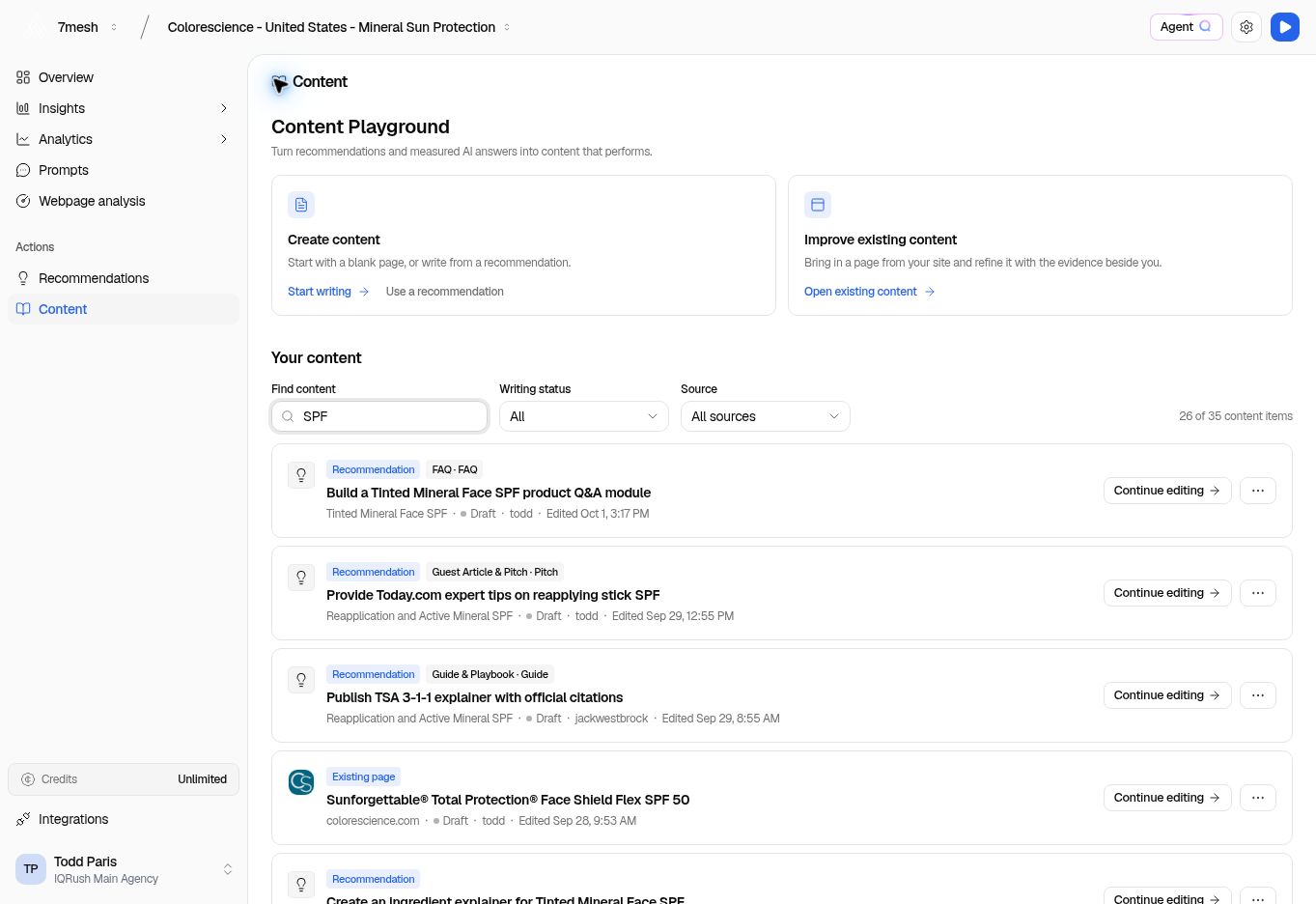 1. Enter part of the title in **Find content**.
2. Use **Writing status** to narrow the stage of work.
3. Use **Source** to choose **Recommendations**, **Existing pages**, or **My drafts**.
4. Check the item’s title, source, and last edit details.
5. Choose **Continue editing**.
Clear the search and filters if a draft seems to be missing. Use the page controls to see additional items.
A recommendation title, brief working title, and saved document title can differ. In the example, the saved TSA draft has a different title from the recommendation that started it. Use the document’s links back to the recommendation and brief to confirm the connection.
**Next:** [Edit the draft](/guides/17-write-content).
This documentation is built and hosted on [Mintlify](https://mintlify.com), a developer documentation platform.
1. Enter part of the title in **Find content**.
2. Use **Writing status** to narrow the stage of work.
3. Use **Source** to choose **Recommendations**, **Existing pages**, or **My drafts**.
4. Check the item’s title, source, and last edit details.
5. Choose **Continue editing**.
Clear the search and filters if a draft seems to be missing. Use the page controls to see additional items.
A recommendation title, brief working title, and saved document title can differ. In the example, the saved TSA draft has a different title from the recommendation that started it. Use the document’s links back to the recommendation and brief to confirm the connection.
**Next:** [Edit the draft](/guides/17-write-content).
This documentation is built and hosted on [Mintlify](https://mintlify.com), a developer documentation platform.