> ## Documentation Index
> Fetch the complete documentation index at: https://docs.iqrush.ai/llms.txt
> Use this file to discover all available pages before exploring further.
# Choose a recommendation to work on
> Open Recommendations to turn the results into a practical task.
Open **Recommendations** to turn the results into a practical task. Start with one item your team can complete and check.
Use the strength of the measurement to set the priority. Before committing substantial effort because of a rank or apparent change, review **Results stability**, **Domain SNR**, the relevant confidence intervals, and the supporting sources. A recommendation is a proposed action; its existence does not certify that the entire measurement is decision-grade.
## Browse content work
The default **Content Agents** tab groups recommendations by the kind of content involved.
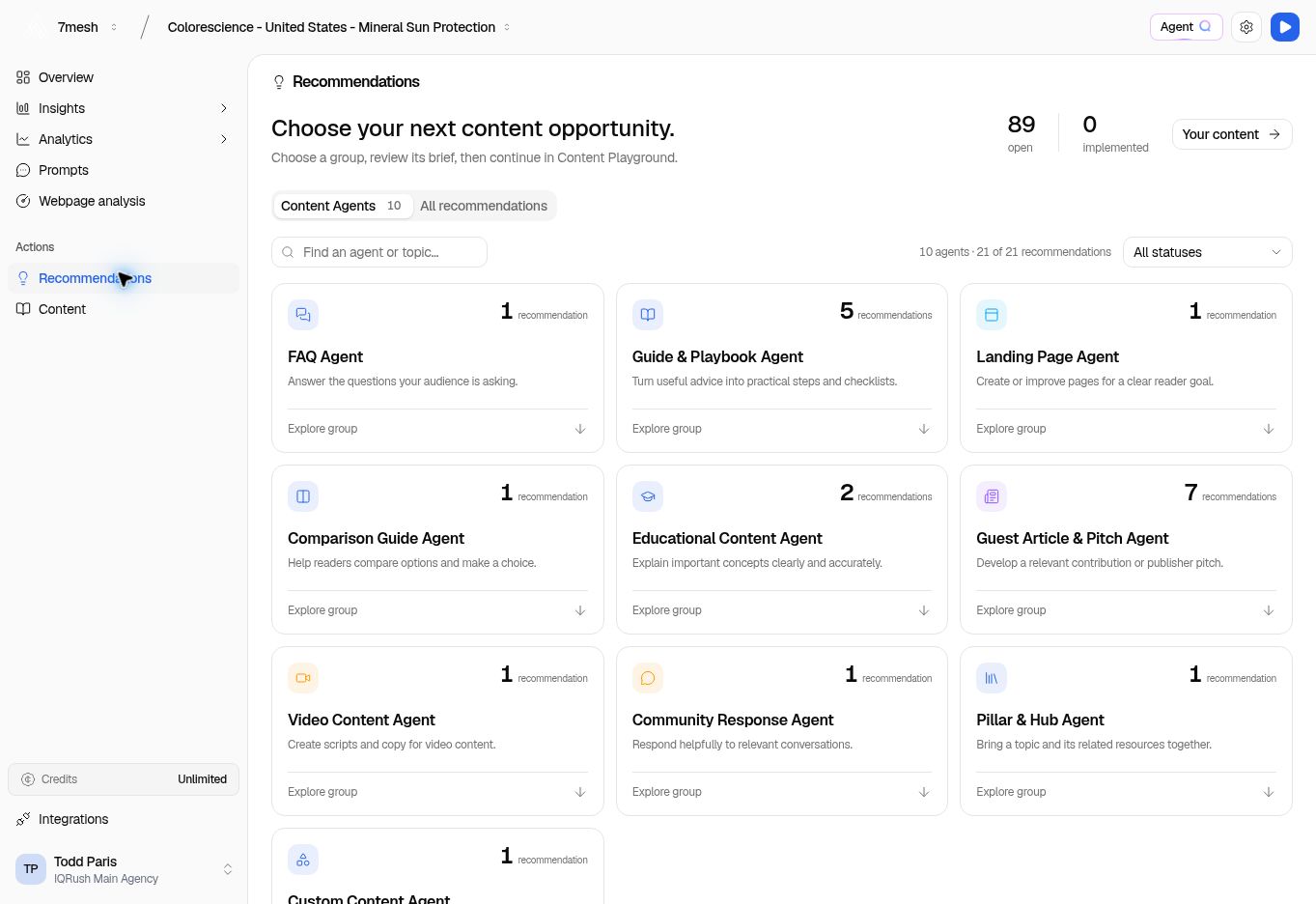 1. Choose a relevant group, such as **Guide & Playbook Agent**.
2. Use the search field to find an agent or topic if needed.
3. Use **All statuses** to change which recommendation statuses are included.
4. Read a recommendation’s title, reason, topic, source references, priority, and effort when supplied.
5. Select **Recommendation details** to inspect the evidence, or **Review brief** to prepare the writing task.
The Colorescience example follows **Create TSA-proof stick-and-powder reapplication travel page**. The recommendation is a proposed task; review its factual assumptions before writing.
## Browse all work
Choose **All recommendations** for the full list. Use the work-type filters:
| Filter | Work it groups |
| - | - |
| **New content** | Create a new piece. |
| **Improve page** | Improve an existing page. |
| **Digital pubs** | Work involving digital publications. |
| **Social** | Work for social or community channels. |
| **Technical** | Website changes to review with the person who maintains your site. |
Use **Search recommendations** and the status selector to narrow the list.
## Read the detail
The detail page has **Suggested plan**, **Activity**, and **Results** tabs. Check **Priority**, **Effort**, and the page or source context before starting.
A label such as **Still recommended · 2 runs** means the item has remained relevant across those runs. It does not mean the task has been completed.
If the rationale or evidence is missing, the page may say so. Use the information actually supplied and ask for clarification rather than guessing what the missing rationale would have been.
## Ask Agent Q about the recommendation
“Explain this recommendation, the evidence behind it, and the first practical step.”
Open the recommendation and use **Ask Agent Q** so the item is part of the conversation. See more [questions and reports](/guides/31-questions-and-reports).
**Next:** [Prepare the brief](/guides/15-content-brief), or [handle a technical recommendation](/guides/21-technical-recommendations).
This documentation is built and hosted on [Mintlify](https://mintlify.com), a developer documentation platform.
1. Choose a relevant group, such as **Guide & Playbook Agent**.
2. Use the search field to find an agent or topic if needed.
3. Use **All statuses** to change which recommendation statuses are included.
4. Read a recommendation’s title, reason, topic, source references, priority, and effort when supplied.
5. Select **Recommendation details** to inspect the evidence, or **Review brief** to prepare the writing task.
The Colorescience example follows **Create TSA-proof stick-and-powder reapplication travel page**. The recommendation is a proposed task; review its factual assumptions before writing.
## Browse all work
Choose **All recommendations** for the full list. Use the work-type filters:
| Filter | Work it groups |
| - | - |
| **New content** | Create a new piece. |
| **Improve page** | Improve an existing page. |
| **Digital pubs** | Work involving digital publications. |
| **Social** | Work for social or community channels. |
| **Technical** | Website changes to review with the person who maintains your site. |
Use **Search recommendations** and the status selector to narrow the list.
## Read the detail
The detail page has **Suggested plan**, **Activity**, and **Results** tabs. Check **Priority**, **Effort**, and the page or source context before starting.
A label such as **Still recommended · 2 runs** means the item has remained relevant across those runs. It does not mean the task has been completed.
If the rationale or evidence is missing, the page may say so. Use the information actually supplied and ask for clarification rather than guessing what the missing rationale would have been.
## Ask Agent Q about the recommendation
“Explain this recommendation, the evidence behind it, and the first practical step.”
Open the recommendation and use **Ask Agent Q** so the item is part of the conversation. See more [questions and reports](/guides/31-questions-and-reports).
**Next:** [Prepare the brief](/guides/15-content-brief), or [handle a technical recommendation](/guides/21-technical-recommendations).
This documentation is built and hosted on [Mintlify](https://mintlify.com), a developer documentation platform.