> ## Documentation Index
> Fetch the complete documentation index at: https://docs.iqrush.ai/llms.txt
> Use this file to discover all available pages before exploring further.
# See where your brand is mentioned
> Open Insights → Mentions to see which brands, products, and other named entities appear in the measured answers.
Open **Insights → Mentions** to see which brands, products, and other named entities appear in the measured answers.
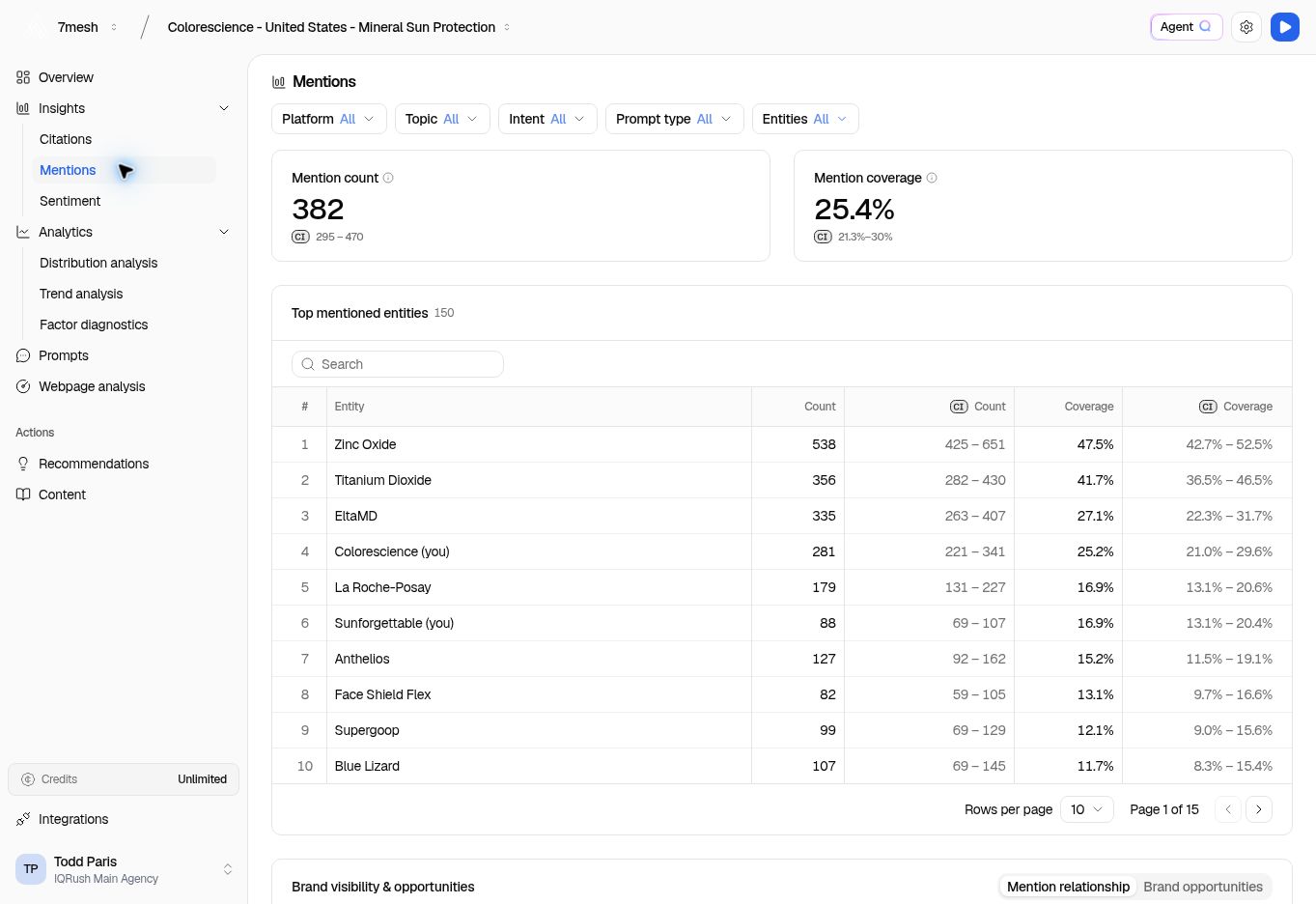
An **entity** is a named thing. The list can contain ingredients or products as well as companies. In the Colorescience example, sunscreen ingredients appear alongside brand names.
 ## Review mentions
1. Check **Mention count** and **Mention coverage**, together with the available confidence intervals.
2. Use **Platform**, **Topic**, **Intent**, and **Prompt type** to focus your review.
3. Use **Entities** when you want a smaller set of names.
4. Find your brand in **Top mentioned entities** with **Search entities**.
5. Read the row’s count, coverage, and confidence interval together.
**Mention count** records mentions. **Mention coverage** counts responses containing at least one qualifying mention. For one platform, if your brand appears in three of six measured responses, mention coverage is 50%. Repeating the brand several times in one response does not make that response count more than once for coverage.
The headline brand result can include several recognized names, while an individual entity row represents that entity. The same response can contain more than one of those names. Do not add their separate coverage percentages to recreate the headline.
Specific **Brand terms** help make the result useful. Review alternative spellings, product names, and acronyms during setup, and avoid generic category words that could refer to many businesses. [Review brand-term best practices](/guides/02-create-project).
## Explore the supporting views
| View | Use it to |
| - | - |
| **Brand visibility & opportunities** | Explore relationships between sources and entities, or review brand opportunities. |
| **Mention relationship** | See the source-to-entity connections for the selection. |
| **Brand opportunities** | Examine the opportunities offered for the selected brands. |
| **Sources attributed to mentions** | Inspect source rows for an entity, including response, statement, and citation counts. |
| **Brand visibility matrix (mention coverage)** | Compare coverage across AI platforms. |
In the relationship view, start with a few relevant **Entities** so the connections are easy to read. Use the available source and layout controls to adjust the view.
## Turn the result into a question
If your brand appears frequently on one platform but rarely on another, use **Platform** to inspect each separately. Compare the intervals as well as the percentages, then check **Citations** for the sources used there. A small difference with substantial uncertainty is a question to investigate, not yet a firm competitive conclusion.
Mention coverage describes the answers measured in your project. It does not represent every conversation on an AI platform.
## Ask about competitive visibility
“Where do competitors appear when we do not? Show the topics and supporting answers.”
Use Agent Q or connected ChatGPT or Claude with the same project and run. See more [questions and reports](/guides/31-questions-and-reports).
**Next:** [Read sentiment](/guides/09-sentiment).
This documentation is built and hosted on [Mintlify](https://mintlify.com), a developer documentation platform.
## Review mentions
1. Check **Mention count** and **Mention coverage**, together with the available confidence intervals.
2. Use **Platform**, **Topic**, **Intent**, and **Prompt type** to focus your review.
3. Use **Entities** when you want a smaller set of names.
4. Find your brand in **Top mentioned entities** with **Search entities**.
5. Read the row’s count, coverage, and confidence interval together.
**Mention count** records mentions. **Mention coverage** counts responses containing at least one qualifying mention. For one platform, if your brand appears in three of six measured responses, mention coverage is 50%. Repeating the brand several times in one response does not make that response count more than once for coverage.
The headline brand result can include several recognized names, while an individual entity row represents that entity. The same response can contain more than one of those names. Do not add their separate coverage percentages to recreate the headline.
Specific **Brand terms** help make the result useful. Review alternative spellings, product names, and acronyms during setup, and avoid generic category words that could refer to many businesses. [Review brand-term best practices](/guides/02-create-project).
## Explore the supporting views
| View | Use it to |
| - | - |
| **Brand visibility & opportunities** | Explore relationships between sources and entities, or review brand opportunities. |
| **Mention relationship** | See the source-to-entity connections for the selection. |
| **Brand opportunities** | Examine the opportunities offered for the selected brands. |
| **Sources attributed to mentions** | Inspect source rows for an entity, including response, statement, and citation counts. |
| **Brand visibility matrix (mention coverage)** | Compare coverage across AI platforms. |
In the relationship view, start with a few relevant **Entities** so the connections are easy to read. Use the available source and layout controls to adjust the view.
## Turn the result into a question
If your brand appears frequently on one platform but rarely on another, use **Platform** to inspect each separately. Compare the intervals as well as the percentages, then check **Citations** for the sources used there. A small difference with substantial uncertainty is a question to investigate, not yet a firm competitive conclusion.
Mention coverage describes the answers measured in your project. It does not represent every conversation on an AI platform.
## Ask about competitive visibility
“Where do competitors appear when we do not? Show the topics and supporting answers.”
Use Agent Q or connected ChatGPT or Claude with the same project and run. See more [questions and reports](/guides/31-questions-and-reports).
**Next:** [Read sentiment](/guides/09-sentiment).
This documentation is built and hosted on [Mintlify](https://mintlify.com), a developer documentation platform.