> ## Documentation Index
> Fetch the complete documentation index at: https://docs.iqrush.ai/llms.txt
> Use this file to discover all available pages before exploring further.
# Choose where your prompts come from
> A prompt is a question IQRush asks an AI engine during a run.
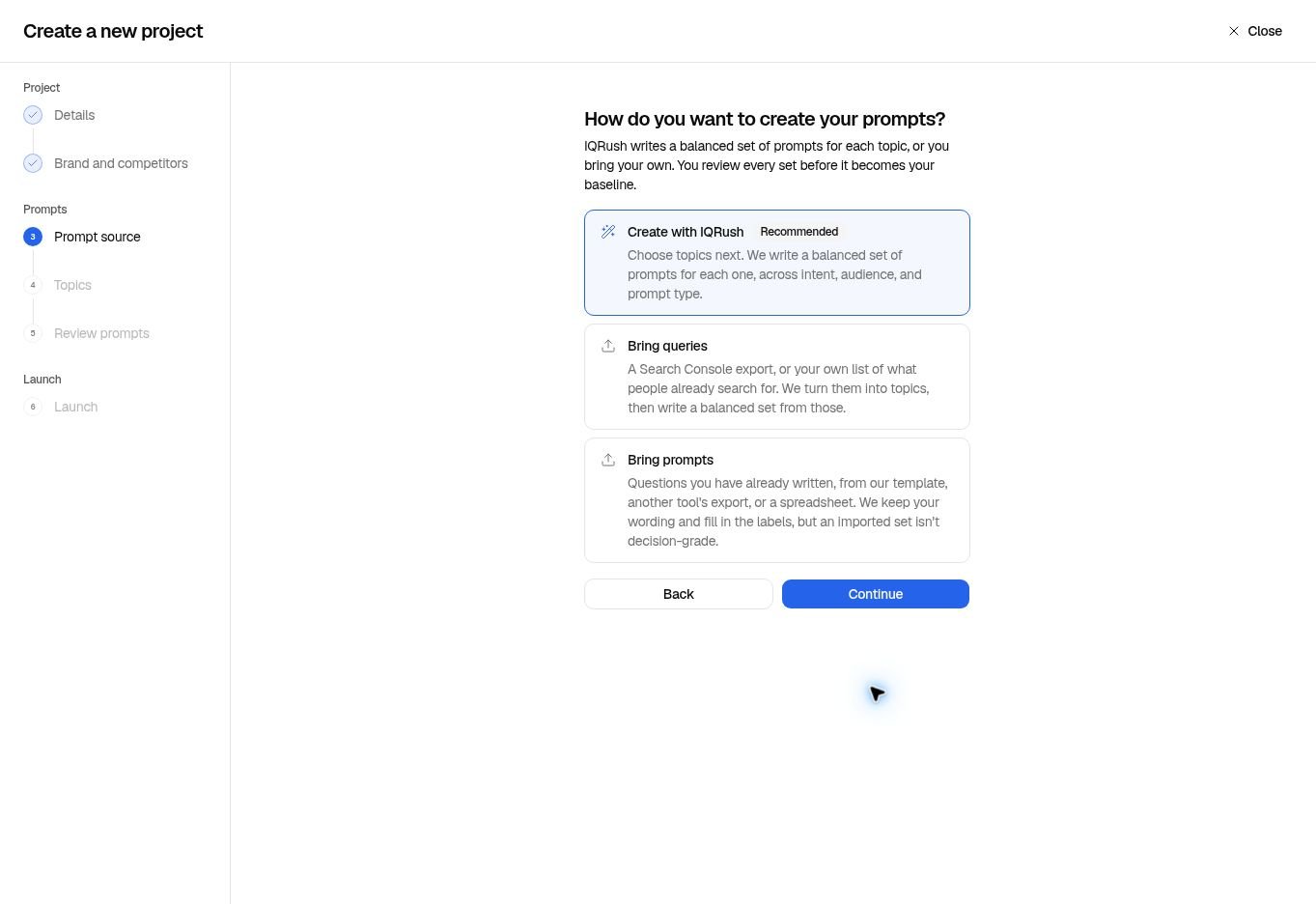
A prompt is a question IQRush asks an AI engine during a run. On **Prompt source**, choose the route that matches what you already have.
 | Choose | Use it when | What happens next |
| - | - | - |
| **Create with IQRush** | You know the subjects you want to measure and want help writing questions. | Select topics. IQRush prepares a balanced prompt set for you to review. |
| **Bring queries** | You have search phrases, such as a Search Console export. | IQRush groups the phrases into topics. You choose topics, then review a newly prepared, balanced prompt set. |
| **Bring prompts** | You already have complete questions you want to use. | IQRush keeps the wording of accepted prompts and fills in missing labels. You select topics and review the set. |
## Bring queries
1. Choose **Bring queries**, then **Continue**.
2. Upload a **CSV, ZIP, or XLSX** file, up to **3 MB**.
3. Review the accepted rows and any messages about the file.
4. Select **Continue**, choose the topics you want, and review the generated prompts.
Use one query per row. Clicks and impressions are optional and help order the suggested topics. The screen offers examples, including **Search Console export** and **Plain query list**. Save your own plain list in one of the accepted upload formats.
A phrase such as “mineral sunscreen for travel” is a query. This route turns it into topics and questions; it does not promise to run that phrase exactly as written. You can upload an export without connecting a Google account.
## Bring prompts
1. Choose **Bring prompts**, then **Continue**.
2. Use **Template (CSV)**, **Template (XLSX)**, or **Example list** if you need a starting file.
3. Upload a **CSV, TXT, or XLSX** file, up to **3 MB**, with one question per row.
4. Review the accepted rows, labels, and any skipped content.
5. Choose the topics to include and continue to the prompt review.
Keep topic labels in your file if you already have them. Review any labels filled in by IQRush. The final set may contain fewer rows than the uploaded file because of selection, validation, or account limits; use the review count as your check.
## Keep discovery prompts non-branded
For a project measuring how people discover brands, **leave brand names out of the prompts**. That includes your brand, its alternative spellings, recognizable product names and acronyms, and competitor names. Naming a brand directs the answer toward that brand and biases the visibility comparison.
| Purpose | Example prompt |
| - | - |
| Measure non-branded discovery | “Which tinted mineral sunscreens suit sensitive skin and are easy to reapply during a day outdoors?” |
| Examine a named brand | “What does Colorescience offer for tinted mineral sun protection, and what are its limitations?” |
The first question lets the engine choose which brands to mention. The second deliberately asks it about Colorescience. Both can be useful, but they measure different things.
## Use a separate branded project when that is the question
Choose **Bring prompts** for a deliberate branded study. It can help you examine how an AI engine describes your brand or products, what concerns it raises, and whether it introduces competitors into an answer about you.
Keep that study in a separate, clearly named project. Review the wording of the answers before describing a competitor as diverting attention from your brand. A competitor appearing in an answer does not by itself show deliberate interference.
Do not mix branded and non-branded results into one discovery benchmark. A high mention rate in a question that already names your brand does not establish strong unaided visibility.
## Build a useful measurement set
Cover distinct customer needs, audiences, and stages of a decision. A set dominated by one question type can tell you about that narrow situation while missing the wider picture. Rephrasing the same question repeatedly does not create the same breadth as adding a new customer situation.
The **Bring prompts** screen says an imported set is not “decision-grade.” Importing and labeling a list does not establish that it is balanced or that its results will be sufficiently reliable. Review the prompt checks before launch, then the run’s stability, signal-to-noise, and confidence intervals afterward. A generated set also needs that post-run review; prompt count alone cannot certify the result.
**Next:** [Review your prompt set](/guides/04-review-prompts).
This documentation is built and hosted on [Mintlify](https://mintlify.com), a developer documentation platform.
| Choose | Use it when | What happens next |
| - | - | - |
| **Create with IQRush** | You know the subjects you want to measure and want help writing questions. | Select topics. IQRush prepares a balanced prompt set for you to review. |
| **Bring queries** | You have search phrases, such as a Search Console export. | IQRush groups the phrases into topics. You choose topics, then review a newly prepared, balanced prompt set. |
| **Bring prompts** | You already have complete questions you want to use. | IQRush keeps the wording of accepted prompts and fills in missing labels. You select topics and review the set. |
## Bring queries
1. Choose **Bring queries**, then **Continue**.
2. Upload a **CSV, ZIP, or XLSX** file, up to **3 MB**.
3. Review the accepted rows and any messages about the file.
4. Select **Continue**, choose the topics you want, and review the generated prompts.
Use one query per row. Clicks and impressions are optional and help order the suggested topics. The screen offers examples, including **Search Console export** and **Plain query list**. Save your own plain list in one of the accepted upload formats.
A phrase such as “mineral sunscreen for travel” is a query. This route turns it into topics and questions; it does not promise to run that phrase exactly as written. You can upload an export without connecting a Google account.
## Bring prompts
1. Choose **Bring prompts**, then **Continue**.
2. Use **Template (CSV)**, **Template (XLSX)**, or **Example list** if you need a starting file.
3. Upload a **CSV, TXT, or XLSX** file, up to **3 MB**, with one question per row.
4. Review the accepted rows, labels, and any skipped content.
5. Choose the topics to include and continue to the prompt review.
Keep topic labels in your file if you already have them. Review any labels filled in by IQRush. The final set may contain fewer rows than the uploaded file because of selection, validation, or account limits; use the review count as your check.
## Keep discovery prompts non-branded
For a project measuring how people discover brands, **leave brand names out of the prompts**. That includes your brand, its alternative spellings, recognizable product names and acronyms, and competitor names. Naming a brand directs the answer toward that brand and biases the visibility comparison.
| Purpose | Example prompt |
| - | - |
| Measure non-branded discovery | “Which tinted mineral sunscreens suit sensitive skin and are easy to reapply during a day outdoors?” |
| Examine a named brand | “What does Colorescience offer for tinted mineral sun protection, and what are its limitations?” |
The first question lets the engine choose which brands to mention. The second deliberately asks it about Colorescience. Both can be useful, but they measure different things.
## Use a separate branded project when that is the question
Choose **Bring prompts** for a deliberate branded study. It can help you examine how an AI engine describes your brand or products, what concerns it raises, and whether it introduces competitors into an answer about you.
Keep that study in a separate, clearly named project. Review the wording of the answers before describing a competitor as diverting attention from your brand. A competitor appearing in an answer does not by itself show deliberate interference.
Do not mix branded and non-branded results into one discovery benchmark. A high mention rate in a question that already names your brand does not establish strong unaided visibility.
## Build a useful measurement set
Cover distinct customer needs, audiences, and stages of a decision. A set dominated by one question type can tell you about that narrow situation while missing the wider picture. Rephrasing the same question repeatedly does not create the same breadth as adding a new customer situation.
The **Bring prompts** screen says an imported set is not “decision-grade.” Importing and labeling a list does not establish that it is balanced or that its results will be sufficiently reliable. Review the prompt checks before launch, then the run’s stability, signal-to-noise, and confidence intervals afterward. A generated set also needs that post-run review; prompt count alone cannot certify the result.
**Next:** [Review your prompt set](/guides/04-review-prompts).
This documentation is built and hosted on [Mintlify](https://mintlify.com), a developer documentation platform.