> ## Documentation Index
> Fetch the complete documentation index at: https://docs.iqrush.ai/llms.txt
> Use this file to discover all available pages before exploring further.
# Connect ChatGPT or Claude
> Connect an assistant to your IQRush account so it can retrieve data for the projects you can access. Use the connection details from the same environment as your data.
Connect an assistant to your IQRush account so it can retrieve data for the projects you can access. Use the connection details from the same environment as your data.
## Find your connection details
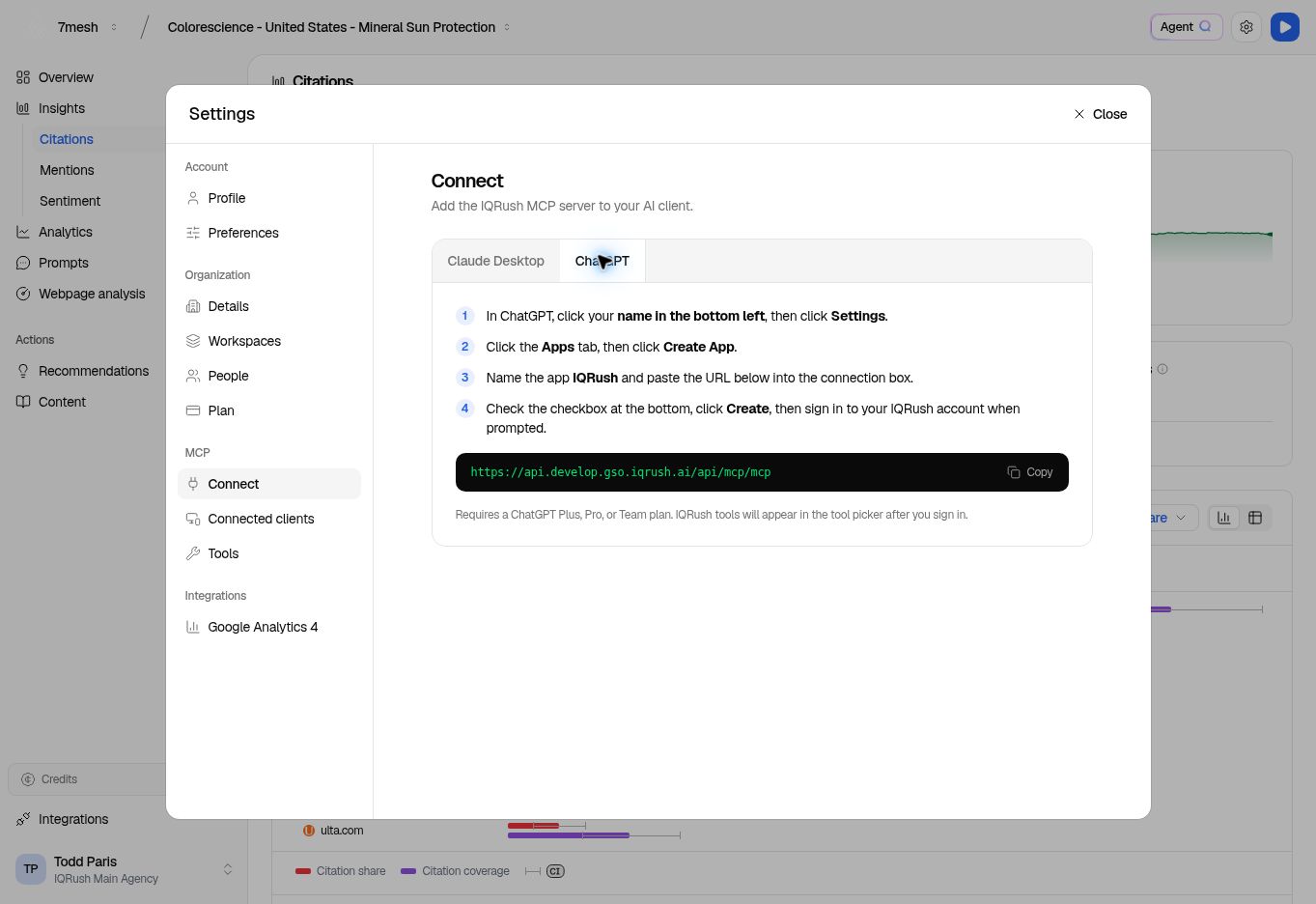
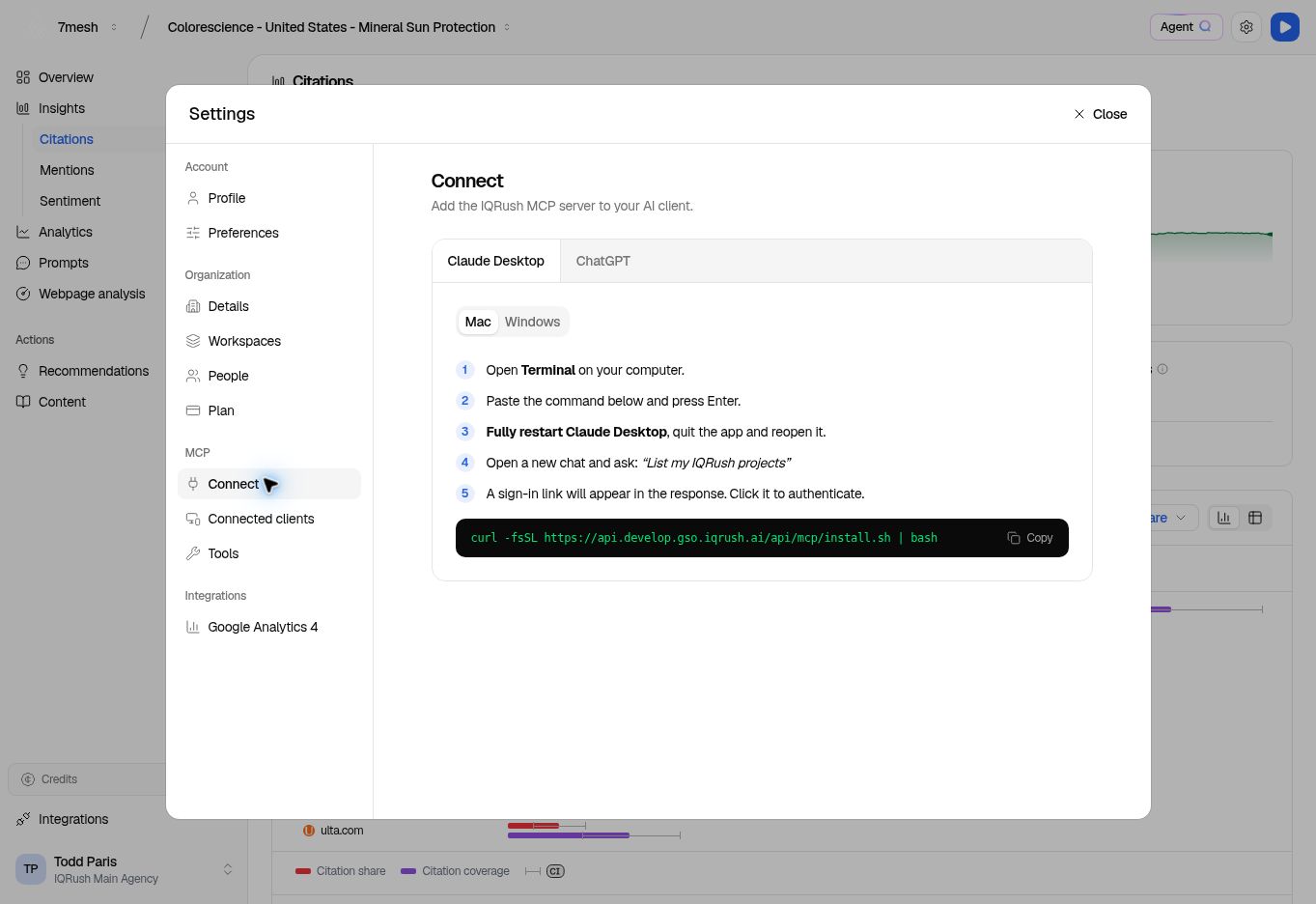
1. Open **Settings** in IQRush.
2. Under **MCP**, select **Connect**.
3. Choose **ChatGPT** for the remote URL or **Claude Desktop** for the installer instructions.
4. Copy the value shown in the interface.
The production remote URL documented for this service is:
```text theme={null}
https://api.prod.gso.iqrush.ai/api/mcp/mcp
```
A Dev connection uses a different URL and data. Do not use the Dev address shown in these screenshots for a production connection.
## ChatGPT
In ChatGPT, open **Settings → Apps** and use the custom app creation option available to your account. Developer mode or workspace administrator access may be required. Name the connection **IQRush**, enter the remote URL, and complete the IQRush sign-in and consent flow. Enable or select the connection in the conversation where you want to use it.
 If the creation option is missing, check [OpenAI's current custom MCP app requirements](https://help.openai.com/en/articles/12584461-developer-mode-and-mcp-apps-in-chatgpt).
## Claude remote connection
In Claude's connector settings, add a custom remote connector using the IQRush remote URL. Complete the IQRush browser sign-in and consent flow. Follow [Anthropic's current remote connector instructions](https://support.claude.com/en/articles/11175166-get-started-with-custom-connectors-using-remote-mcp) for the controls available to your account and workspace.
## Claude Desktop installer
The **Claude Desktop** tab in IQRush offers **macOS / Linux** and **Windows** instructions. Copy the command for your operating system, run it in the named terminal, then fully quit and reopen Claude Desktop. Ask it to list your IQRush projects and follow the sign-in link if prompted.
If the creation option is missing, check [OpenAI's current custom MCP app requirements](https://help.openai.com/en/articles/12584461-developer-mode-and-mcp-apps-in-chatgpt).
## Claude remote connection
In Claude's connector settings, add a custom remote connector using the IQRush remote URL. Complete the IQRush browser sign-in and consent flow. Follow [Anthropic's current remote connector instructions](https://support.claude.com/en/articles/11175166-get-started-with-custom-connectors-using-remote-mcp) for the controls available to your account and workspace.
## Claude Desktop installer
The **Claude Desktop** tab in IQRush offers **macOS / Linux** and **Windows** instructions. Copy the command for your operating system, run it in the named terminal, then fully quit and reopen Claude Desktop. Ask it to list your IQRush projects and follow the sign-in link if prompted.
 ## Check and manage the connection
Ask: “List the IQRush projects I can access.” A successful answer should use the connector and return your project list. Then specify a project and ask for its completed runs.
Use **Settings → MCP → Connected clients** to review connections. **Disconnect** revokes that connection; reconnect and sign in again when you want to restore it. An empty project list can also mean that the signed-in user has no access to the expected workspace.
Next: [Select a project and read your first measurement](/developers/guides/02-mcp-quickstart). The [authentication guide](/developers/guides/04-authentication) is for developers implementing authorization in their own client.
This documentation is built and hosted on [Mintlify](https://mintlify.com), a developer documentation platform.
## Check and manage the connection
Ask: “List the IQRush projects I can access.” A successful answer should use the connector and return your project list. Then specify a project and ask for its completed runs.
Use **Settings → MCP → Connected clients** to review connections. **Disconnect** revokes that connection; reconnect and sign in again when you want to restore it. An empty project list can also mean that the signed-in user has no access to the expected workspace.
Next: [Select a project and read your first measurement](/developers/guides/02-mcp-quickstart). The [authentication guide](/developers/guides/04-authentication) is for developers implementing authorization in their own client.
This documentation is built and hosted on [Mintlify](https://mintlify.com), a developer documentation platform.